
MPEG-DASH MPD to MP4: How DASH Works and How to Convert It on Mac
An .mpd is an XML manifest for separate audio and video tracks. How to read one, why Homebrew's FFmpeg can't, and three tested ways to make an MP4.
On this page
To convert an MPEG-DASH .mpd stream to MP4, a tool has to read the XML manifest, choose one video and one audio representation, download each one’s initialization segment and media segments, and then mux the two tracks into a single MP4. Most DASH streams keep audio and video apart, so downloading “the video” alone gives you a silent file. On a Mac you can do it with a DASH-aware downloader such as VidNeat, with an FFmpeg build that includes its DASH demuxer, or by hand with curl and FFmpeg. I tested all three. One surprise: the standard Homebrew FFmpeg can’t open an .mpd at all.
The measurements come from a 60-second test stream (1080p and 720p H.264 video, AAC audio, 6-second segments) served from my own Mac. I ran them on an Apple M4 Mac with macOS 26.6.2 on 21 October 2026.
Rights first: only convert streams you’re entitled to keep. A manifest with a
ContentProtectionelement is DRM-protected, and nothing here works on it.
Key takeaways:
- An
.mpdis an XML manifest: Periods, then Adaptation Sets, then Representations, then segments. - Audio and video are usually separate, so you need two tracks muxed together, or the MP4 is silent.
- Homebrew’s FFmpeg 8.1.2 has no DASH demuxer (it needs libxml2), so
ffmpeg -i manifest.mpdfails with “Invalid data found”. - By hand works with any FFmpeg:
cateach init segment and its chunks, then mux. My result was a 60.000-second 1080p MP4, 38.6 MB. ContentProtectionin the manifest means DRM, and nothing here works on it.
What DASH is
Dynamic Adaptive Streaming over HTTP is an ISO/IEC standard, ISO/IEC 23009-1, whose scope is the formats for the Media Presentation Description (MPD) and its segments. IANA registers the manifest’s media type as application/dash+xml. DASH solves the same problem as HLS: several qualities, cut into segments, fetched over plain HTTP, so a player can adapt. The differences are in the details:
| HLS | MPEG-DASH | |
|---|---|---|
| Manifest | Text playlists (.m3u8) |
One XML document (.mpd) |
| Defined by | RFC 8216 (informational) | ISO/IEC 23009-1 |
| Audio and video | Often muxed together in each segment | Usually separate Adaptation Sets |
| Segment addresses | Listed one by one | Often generated from a SegmentTemplate |
| In the browser | Often played through MSE by a JavaScript player | Played through MSE by a JavaScript player |
MDN describes DASH as “effectively a layer built on top of MSE”. In practice, a web page plays DASH with a JavaScript player that feeds Media Source Extensions, so the <video> element shows a blob: address rather than a file. The blob: page explains why that address can’t be downloaded.
Anatomy of an MPD
An MPD is a hierarchy. Each level narrows down what the player can fetch:
- MPD
type="static" mediaPresentationDuration="PT1M0.0S"static means on-demand; a live manifest is dynamic- Period
id="0" start="PT0.0S"A stretch of content. Ad breaks are often separate Periods.- AdaptationSet: video
contentType="video" maxHeight="1080"- Representation 0
avc1.640028 · 1920×1080 · 5.0 Mbit/s - Representation 1
avc1.64001f · 1280×720 · 2.5 Mbit/s
- AdaptationSet: audio
contentType="audio"- Representation 2
mp4a.40.2 · 48 kHz · 128 kbit/s
How segment addresses are built
My test manifest doesn’t list its segments. It describes them with a template:
<SegmentTemplate timescale="1000000" duration="6000000"
  initialization="init-stream$RepresentationID$.m4s"
  media="chunk-stream$RepresentationID$-$Number%05d$.m4s"
  startNumber="1">
Substituting the values gives the real file names. For Representation 0 that’s init-stream0.m4s, then chunk-stream0-00001.m4s, chunk-stream0-00002.m4s and so on. %05d means the number is zero-padded to five digits. duration divided by timescale is 6 seconds per segment, so a 60-second presentation has 10 media segments per Representation. The init segments were tiny, 765 to 835 bytes, because they only hold the codec setup.
Not every MPD uses $Number$. You’ll also meet $Time$ templates with a SegmentTimeline, and SegmentBase, where each Representation is one file read in byte ranges. A good converter handles all of them. Doing it by hand means handling whichever one you’ve got.
Why a browser can’t just save it
- Saving the
.mpdgives you XML. It’s a description, not media. - The media is spread across files. Even my short test needed 22 requests: two init segments and twenty media segments.
- Audio and video arrive separately. If you download only the video Representation’s segments, the result has no sound.
- The player’s address is a blob:. It refers to the MediaSource inside the tab, which nothing else can read.
Method 1: VidNeat
VidNeat is our app, and its bundled engine reads DASH manifests. I ran it with the arguments the app uses for a 1080p download:
- Paste the .mpd address
manifest.mpd - InspectRepresentation heights fill the quality menu
- Pick video + audio
format 0+2Best video at or under your cap, plus the audio track - Fetch both tracksInit + 10 segments each, 5 requests at a time
- Mux into MP4Streams copied, not re-encoded
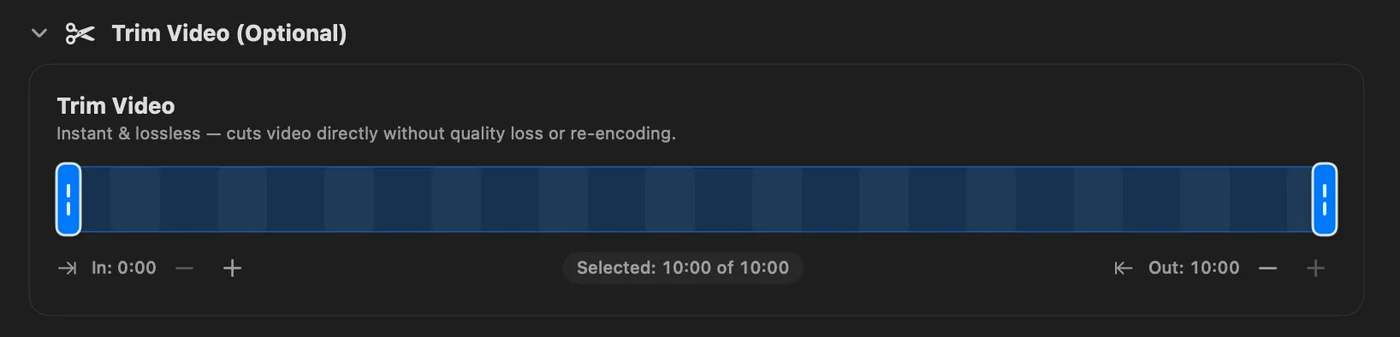
The output was a 1920×1080 H.264 + AAC MP4, 60.000 seconds, 38.6 MB. Setting In and Out before downloading fetches only part of the stream, as with HLS. Selective segment fetching covers that, and I measured it on HLS in the HLS recorder breakdown.
Limits, plainly: VidNeat can’t send custom headers, needs macOS 14 or later, and reports DRM-protected manifests as a permanent failure. I didn’t test it on live (dynamic) DASH.
As with HLS, if a manifest declares no heights, use the paste-and-inspect flow rather than Smart Mode. Inspection switches the quality to Best when there’s no height to compare against.
Method 2: FFmpeg, if your build has DASH
FFmpeg has a DASH demuxer, but it’s optional. FFmpeg’s configure script declares dash_demuxer_deps="libxml2", and Homebrew’s ffmpeg formula doesn’t pass --enable-libxml2. On my Mac, Homebrew’s FFmpeg 8.1.2 listed no dash entry in ffmpeg -demuxers. Pointed at my manifest, it failed with “Invalid data found when processing input”. Check your own build first:
ffmpeg -hide_banner -demuxers | grep -w dashIf that prints a line, this is the usual pattern. The -map choices pick the first video and first audio stream. I couldn’t run it, because my builds lack the demuxer:
ffmpeg -i "https://example.com/manifest.mpd" -map 0:v:0 -map 0:a:0 -c copy video.mp4Method 3: by hand, with curl and FFmpeg
This works with any FFmpeg, because it never asks FFmpeg to read the manifest. It’s practical for $Number$ templates like mine. Each Representation’s init segment followed by its media segments, in order, forms one fragmented MP4 track:
base="https://example.com/dash"
for id in 0 2; do                      # 0 = 1080p video, 2 = audio
  curl -sO "$base/init-stream$id.m4s"
  for n in $(seq 1 10); do
    curl -sO "$base/chunk-stream$id-$(printf %05d $n).m4s"
  done
done
cat init-stream0.m4s chunk-stream0-*.m4s > video.mp4
cat init-stream2.m4s chunk-stream2-*.m4s > audio.mp4
ffmpeg -i video.mp4 -i audio.mp4 -map 0:v -map 1:a -c copy out.mp4
My version of this produced a 60.000-second 1080p MP4 with both tracks, 38.6 MB, the same length as VidNeat’s. Three things to watch:
- Order. The zero padding makes
chunk-stream0-*.m4ssort correctly. Without padding, the shell puts 10 before 2. The TS merging page shows the fix. - Segment count. Work it out from
mediaPresentationDuration,durationandtimescale, or keep requesting until the server returns 404. - Templates and signed URLs.
$Time$templates need theSegmentTimelinevalues, and some CDNs add tokens to every segment request, which makes the manual route tedious.
The three methods compared
| VidNeat (our app) | FFmpeg with DASH | curl + FFmpeg | |
|---|---|---|---|
| Reads the MPD | Yes | Only if built with libxml2 | You read it |
| Chooses representations | Quality menu | -map |
You choose IDs |
| Joins audio and video | Automatically | Automatically | One mux command |
| Fetch only a time range | Set In and Out first | -ss/-t on input, varies |
Pick segments by number |
| Effort | Paste a link | One command, if supported | A script |
| Cost | $14.99 once, 7-day trial | Free | Free |
When it won’t work
ContentProtectionin the manifest. ISO/IEC 23009-1 uses this element to signal content protection, which in browsers means Encrypted Media Extensions and a DRM licence. Stop there. VidNeat reports DRM as a permanent failure, and no method on this page gets around it.- A
dynamicMPD. That’s a live presentation whose segments keep appearing. I didn’t test live DASH for this page. - Expiring or signed URLs. Copy a fresh manifest URL and use it straight away.
Common questions
Can I just rename the .mpd to .mp4?
No. It’s an XML text file, and renaming it doesn’t change its contents.
Why is my downloaded DASH video silent?
You fetched only the video Adaptation Set. Fetch the audio Representation too and mux them, as in Method 3.
Do I need to re-encode to get an MP4?
Not if the codecs fit in MP4. H.264 or HEVC with AAC did in my test, and every method copied the streams unchanged. To trim afterwards without re-encoding, see how to cut a video with FFmpeg.
Can FFmpeg convert MPD to MP4?
Only builds with the DASH demuxer, which needs libxml2. Check with ffmpeg -demuxers | grep -w dash. If nothing prints, use Method 3, which needs no demuxer.
Is DASH the same as HLS?
They solve the same problem. HLS uses text playlists and often muxes audio with video; DASH uses one XML manifest and usually keeps them apart. See how HLS streams are built.
Where do I find the .mpd address?
In the browser’s Network panel, by filtering for mpd. The steps are on the blob: video page.
Summary
- An MPD is an XML manifest: Periods, then Adaptation Sets, then Representations, then segments.
- Audio and video are usually separate, so a converter has to fetch two tracks and mux them.
- Homebrew’s FFmpeg has no DASH demuxer. Check with
ffmpeg -demuxers, or join the segments by hand and mux, which I tested. - VidNeat reads the manifest, picks the best video at or under your cap plus the audio, and writes one MP4. In my test it chose
0+2and produced the full 60-second file. - Manifests with
ContentProtectionare DRM-protected and out of scope.
Related reading
How to Download an M3U8 Video to MP4 on Mac (and From Chrome)
An .m3u8 is a text playlist, not a video. What's inside one, why a browser save fails, and three tested ways to turn it into one MP4 on a Mac.
How to Download a blob:https Video (and Why You Can't Save It Directly)
A blob: address is memory inside one browser tab, not a file. What the specs say, what my tests showed, and how to find the real stream to save.
HLS Stream Recorder: How to Save an HLS Stream as MP4
How HLS is built (playlist types, variants, TS and fMP4 segments), what a downloader does to make one MP4, and how live streams differ. Measured.
Trim with FFmpeg without re-encoding
Install FFmpeg on a Mac, then cut the merged MP4 losslessly.
Get the clip you need. Not the entire video.
A native Mac downloader that fetches the range you mark and cuts by copying streams. Requires macOS 14.0 Sonoma or later.
VidNeat is a software tool. You are responsible for having the rights or permission to access, use, edit and export the media you work with.